CADPEAK
Review connection endtype pairs
Compare the end conditions on detected port pairs.
Before you start
- A cache containing port/endtype extraction results.
Steps
Compare Endtype Pairs
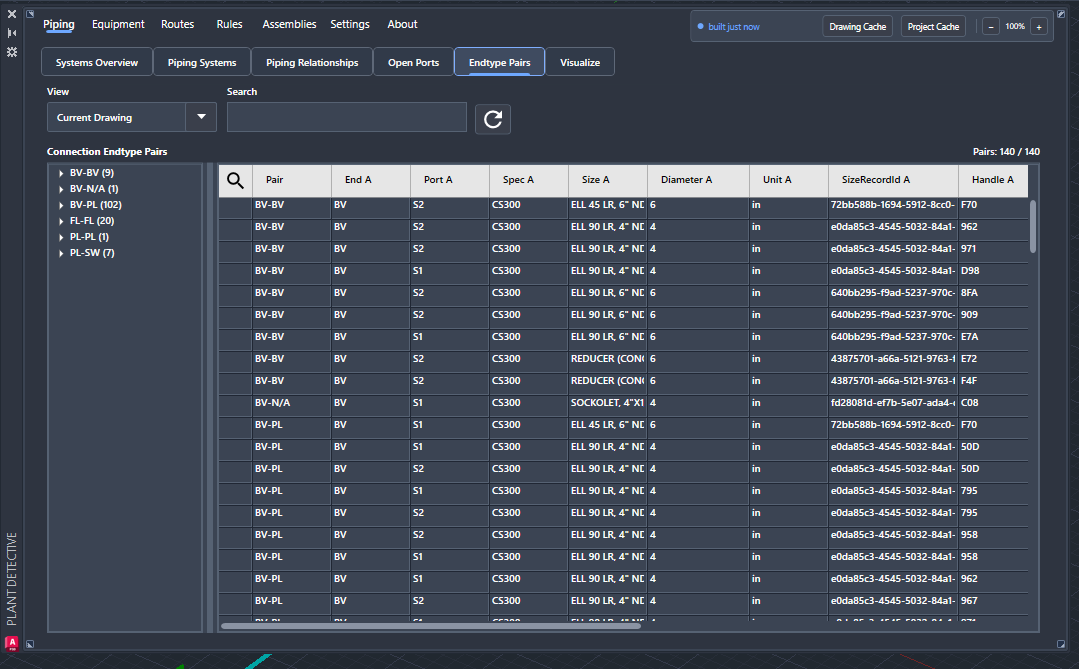
- Open Endtype Pairs and choose scope.
- Expand the pair tree and click a pair group.
- Read Pair, End A, Port A, Spec A, and Size A alongside the corresponding B-side fields.
- Compare diameter and unit fields when sizes appear inconsistent.
- Use Filter → Include … on the relevant endtype or spec cell.
- Use Select Matching Parts or Isolate Matching Parts from the tree where available, or the shared grid actions.
- Export displayed pairs to CSV for a connection-pattern review.
Endtype pairs describe connection patterns in the data. They are separate from the Required/Allowed/Forbidden policies in Connection Rules.
What to expect
This view organizes port-level connection facts separately from saved family/size rule classifications.
Important notes
- Display ordering of a pair does not establish flow direction.
- A compatible-looking endtype name is not a complete engineering verification of a joint.
- Blank or unknown properties can reflect unsupported or unreadable part data.
- Multiple ports on the same two objects require careful review; do not assume one row captures every interface.
Screenshots