CADPEAK
Inspect equipment nozzles and lines
Review the interfaces between equipment, nozzles, and connected piping.
Before you start
- Equipment analysis data available for the chosen scope.
Steps
Review Nozzles & Lines
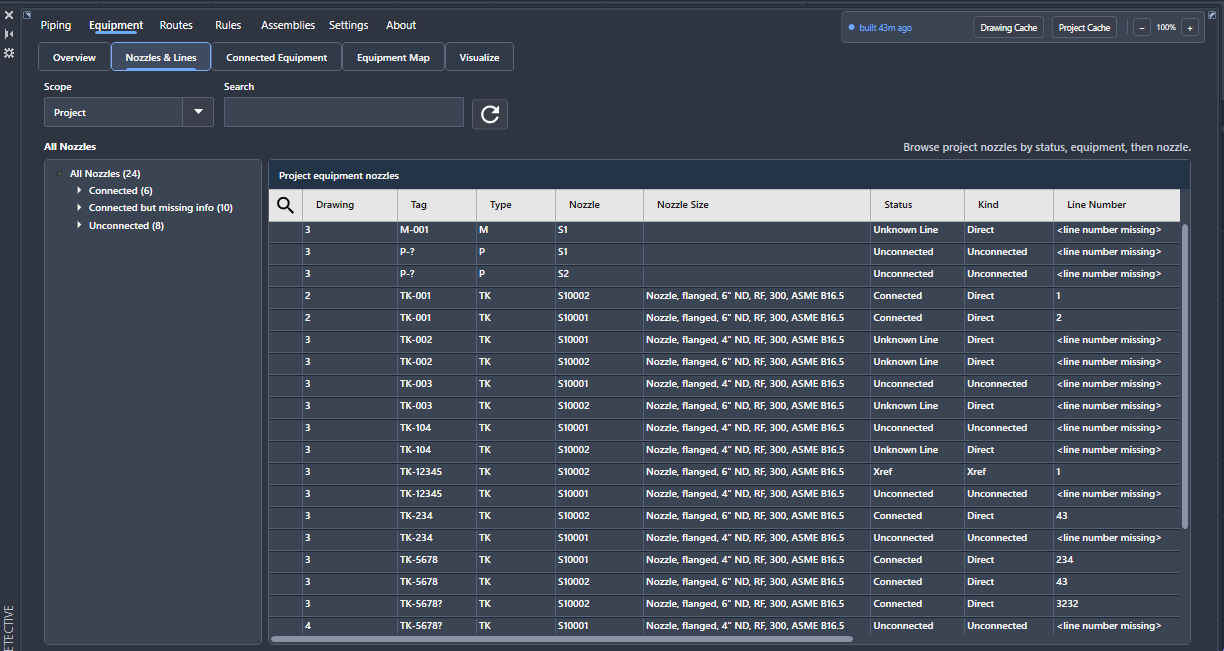
- Open Nozzles & Lines, retaining the intended scope.
- Search for the equipment tag or desired line.
- Expand the nozzle tree and click a group/equipment/nozzle to restrict rows.
- Compare Tag, Type, Nozzle, Nozzle Size, Status, and Kind.
- Read Line Number, Service, Missing Info, Connected Part, and Drawing to explain the condition.
- Double-click a relevant row or use its zoom action.
- Use Filter → Include … on a status/line value to make a review set.
- Use the extra Select Displayed Connected Parts in Drawing or Isolate Displayed Connected Parts in Drawing action for the filtered connected parts.
- In Project, the corresponding actions say … in Active Drawing.
- Use End Isolation when finished and export displayed nozzle rows through Data if needed.
Expected result: The grid identifies individual nozzle connection conditions. A row without a connected-part target cannot be treated as a selectable connected pipe. Inspect the equipment/nozzle itself in the model when needed.
What to expect
The table exposes modeled interface information for inspection.
Important notes
- Missing nozzle or line properties can leave fields empty.
- Line labels are metadata; equal labels alone do not prove physical connectivity.
- Unavailable Xrefs and stale caches can omit interfaces. Check build messages before treating the table as complete.
Screenshots