CADPEAK
Review Xrefs and cross-drawing connections
Inspect external relationships and navigate to available referenced components.
Before you start
- Accessible reference drawings and a current project build.
- Knowledge of which source drawing owns each endpoint.
Steps
- Load the references required for review in Plant 3D.
- Save relevant edits and build the project cache.
- Open a Project connection, piping, or equipment view.
- Inspect source/target drawing information for an external row.
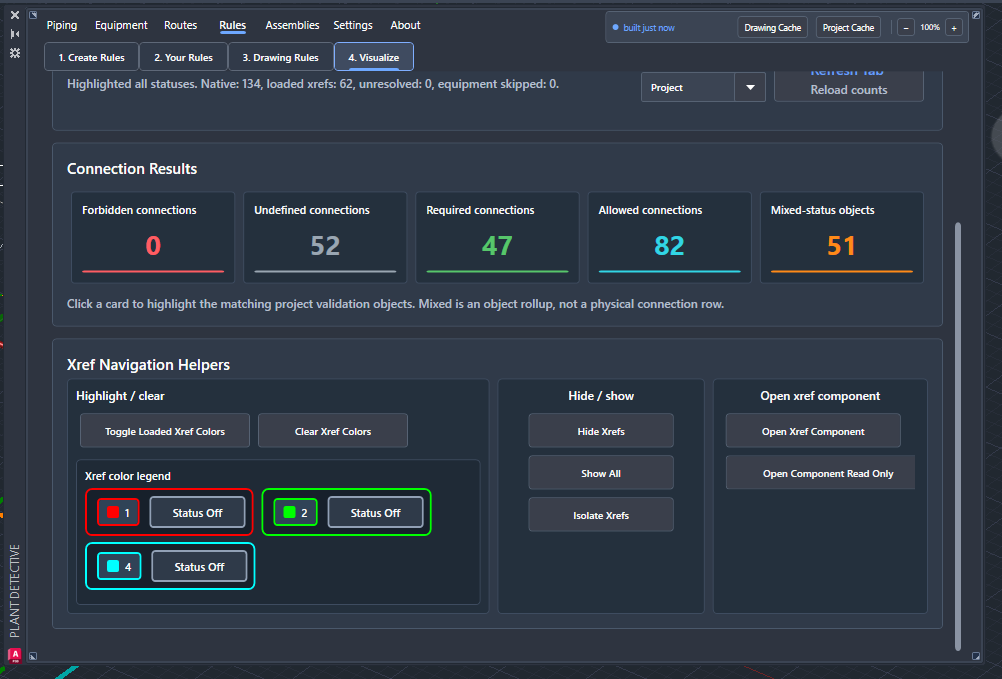
- Use available Xref color/visibility controls to identify loaded references.
- Use Open Xref Component or Open Component Read Only where offered, then confirm the source drawing.
- Review the actual component and connection in the source model.
- After reloads or changes, rebuild and refresh rather than relying on an earlier external result.
Use the offered Xref actions
- In project visualization, use Toggle Loaded Xref Colors and Clear Xref Colors to identify/clear reference colors.
- Use Hide Xrefs, Show All, or Isolate Xrefs deliberately for visibility review.
- Use Open Xref Component or Open Component Read Only to inspect the available source.
- Assembly visualization uses Toggle Xref Colors, Show Xrefs, Open Component, and Open Read Only.
- Confirm the source drawing and transformed component position.
- Restore visibility, rebuild after changes, and refresh project results.
What to expect
External rows connect available drawing facts. A reference that is unloaded, missing, or unindexed can remain unresolved or reduce result coverage.
Important notes
- Copied drawings can share filenames and handles. Verify full source context, especially when names repeat.
- Some builds can retain older external relationships or resolve ambiguous identities incorrectly. Cross-check questionable bridges in the model.
- Nested reference position and source ownership require careful checking before acting on highlights.
- Hide/Show/Isolate Xrefs changes visibility; it does not establish or repair a physical connection.
Screenshots