CADPEAK
Inspect piping systems and networks
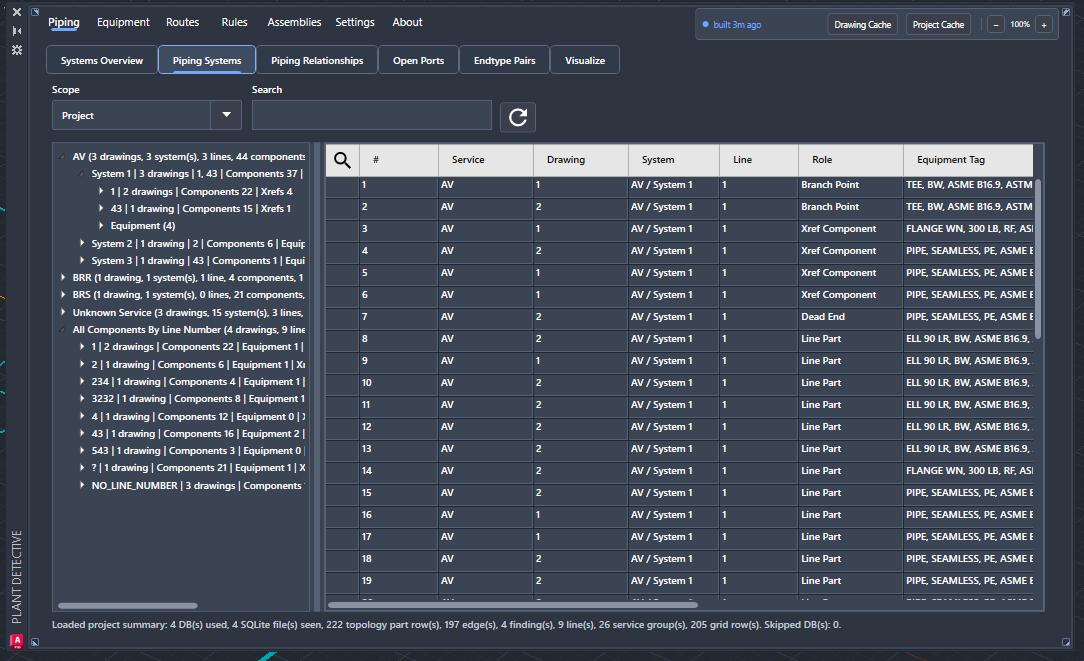
Explore numbered lines and unassigned networks through the piping tree and table.
Before you start
- Topology built for the current drawing or project.
Steps
Examine Piping Systems
- Open Piping Systems.
- Choose the intended scope and refresh if needed.
- Expand the service/system/line tree to the desired group.
- Click a tree label to narrow the grid; use search to narrow further.
- Read Service, System, Line, Role, Equipment Tag, Equipment Port, and Interface.
- Compare Type, Family, Size, and Spec for individual components.
- In Project, also read Drawing before navigating.
- Select a small group of rows and use the available Navigate, Highlight, Select in Drawing, or Isolate in Drawing actions.
- Clear grid filters, search, and tree restrictions independently when returning to the full system.
Expected result: You can distinguish the components assigned to a connected system from its equipment boundary information. Tree groups and grid rows organize the cached network; they do not modify line assignments.
What to expect
Tree and table projections help organize the cached graph. A group can span available project drawing sources when Project scope is used.
Important notes
- A line-number label alone does not guarantee one physically connected network.
- Unassigned equipment interfaces and ordinary unnumbered parts are not necessarily equivalent review cases.
- Loops and branching can make summary calculations expensive; allow the operation to finish.
- Check coverage and the model before concluding that a branch or component is absent.
Screenshots