CADPEAK
Review Systems Overview
Review system-level summaries from available piping topology.
Before you start
- Current drawing/project topology extracted.
- The intended scope selected.
Steps
Review Systems Overview
- Click Piping → Systems Overview.
- Choose Current Drawing or Project in Scope.
- Use the refresh icon (Refresh) after a completed build if results have not updated.
- Use Search for a service, system, or line identifier.
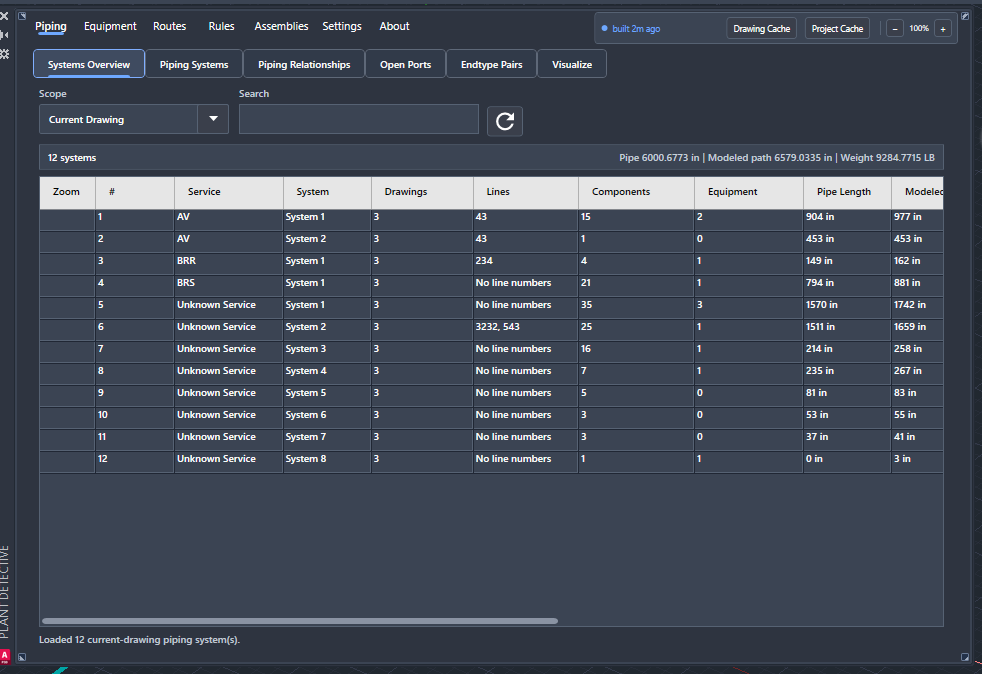
- Compare Service, System, Drawings, Lines, Components, and Equipment to understand each group.
- Read Pipe Length, Modeled Path, and Weight separately. They are distinct measures, not interchangeable totals.
- Read Low, High, and Elevation Span to identify systems with large vertical changes.
- Use the row's Zoom action to frame the system and select selectable components.
- Use Low Point or High Point to navigate to those extremes.
- Use Longest Path to review the connected path. In Current Drawing this zooms to the path; in Project it highlights the path across the active drawing and loaded Xrefs.
Expected result: One row describes a connected system with useful scale and extent information. In project scope, model selection still applies to selectable active-drawing components even when the view can frame Xref components.
What to expect
The view summarizes connected cached topology and its metadata. It is an analytical grouping, not a separately certified process system.
Important notes
- Missing service/line information can affect grouping.
- Agreement among neighboring components can support an inference but does not prove engineering intent.
- Length and weight totals depend on available properties and units. Missing values are not verified zero values.
- Do not treat every system grouping as verified flow direction or internal equipment continuity.
Screenshots