CADPEAK
Review and maintain saved connection rules
Find saved rules, verify their scope, and delete only deliberate selections.
Before you start
- Access to the selected persistent database.
- A backup before making broad shared-library changes.
Steps
Review and manage saved rules
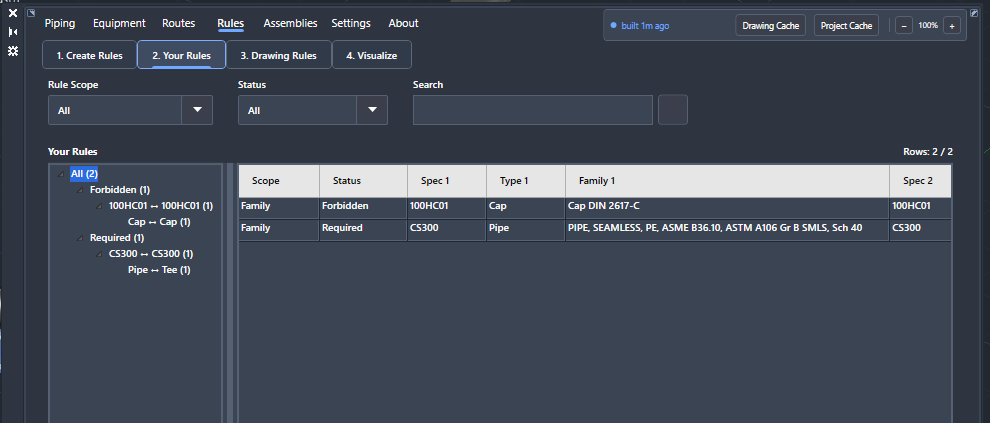
- Open 2. Your Rules. Data loads on opening; use Refresh if a recent change is not visible.
- Start with scope All and status All.
- Choose Part Family or Part Size to restrict scope. Part Family hides size-specific columns.
- Choose Required, Forbidden, Allowed, or Undefined in the status filter when needed.
- Enter search text to narrow the returned rule set.
- Expand the pair tree and click a node to see associated rows. Read the row summary to distinguish a subset from the full returned set.
- Compare Scope, Status, Spec 1/2, Type 1/2, and Family 1/2. For size rules also compare Size 1/2, Diameter 1/2, and Unit 1/2.
- Use the shared Filter and Data menus to narrow, copy, or export definitions.
Change a rule
Return to 1. Create Rules, recreate the same pair at the same scope with the desired status, review the preview, and save. Saving supports updates to existing pair identities. The active saved-rules grid has no inline Edit action.
Delete rules
- Filter to the intended scope and pair.
- Select the exact grid rows.
- Right-click and choose Delete Selected Rule(s).
- Read the confirmation and choose Yes only for the intended set.
- Review the refreshed grid.
The tree context menu provides expansion/collapse controls. Use grid deletion rather than assuming a tree branch can delete rules. Deleting a definition does not edit the model; rebuild validation to see the status change.
What to expect
Your Rules shows persistent configuration, not the complete set of physical connections in a drawing. Deletion removes the selected saved classifications, not model components.
Important notes
- The configured provider determines which library you are maintaining. Confirm it before a shared edit.
- A family rule can still classify a pair after a more specific rule is removed.
- Deletion is not presented as an undoable model operation. Keep a recoverable backup.
- Do not delete all rules to troubleshoot an unavailable database or a stale view.
Screenshots