CADPEAK
Review equipment and its connections
Use the Equipment workspace to inspect equipment found in the selected drawing or project.
Before you start
- Build the relevant drawing or project cache.
Steps
Review Overview
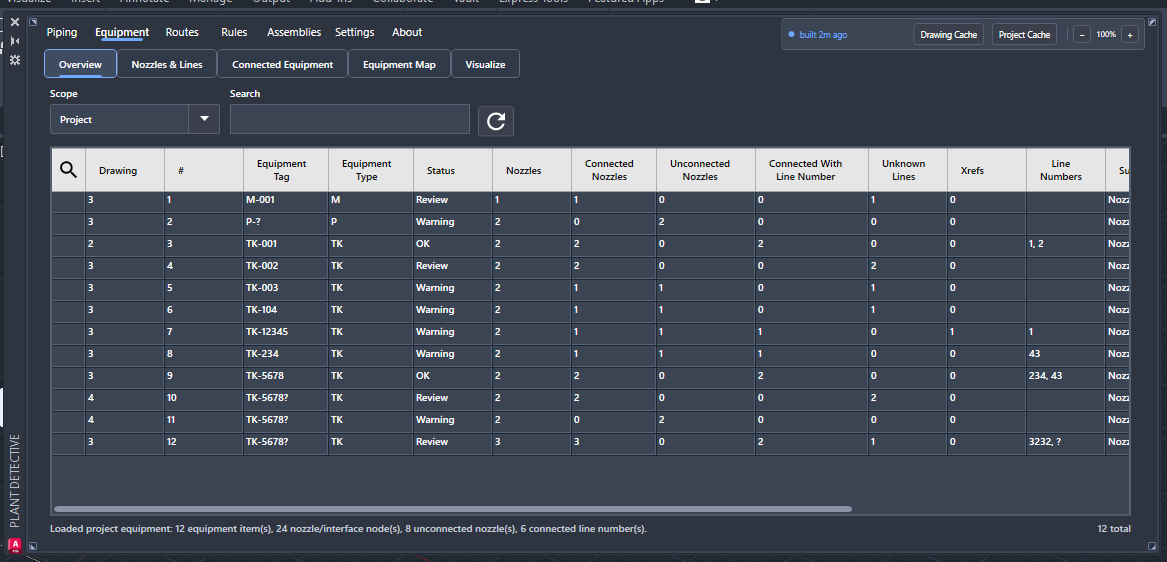
- Open Equipment → Overview.
- Choose Current Drawing or Project using the equipment scope selector.
- Use the refresh control after cache completion if required.
- Search for the equipment tag.
- Read Equipment Tag, Equipment Type, Status, Nozzles, Connected Nozzles, and Unconnected Nozzles.
- Compare Connected With Line Number, Unknown Lines, and Line Numbers to distinguish connection from useful line identification.
- Read Xrefs, Drawing, and Summary for context.
- Use a row's zoom action or double-click to navigate to its available model target.
- Use the shared grid Filter, Data, and drawing actions where offered.
Expected result: You can distinguish an unconnected nozzle from a connected nozzle whose line information is missing. Counts describe the cached model, not unsaved/newly rebuilt information.
In project scope, extra actions include Select Displayed Equipment in Active Drawing and Isolate Displayed Equipment in Active Drawing. Their label deliberately limits the target to the active drawing.
Visualize equipment conditions
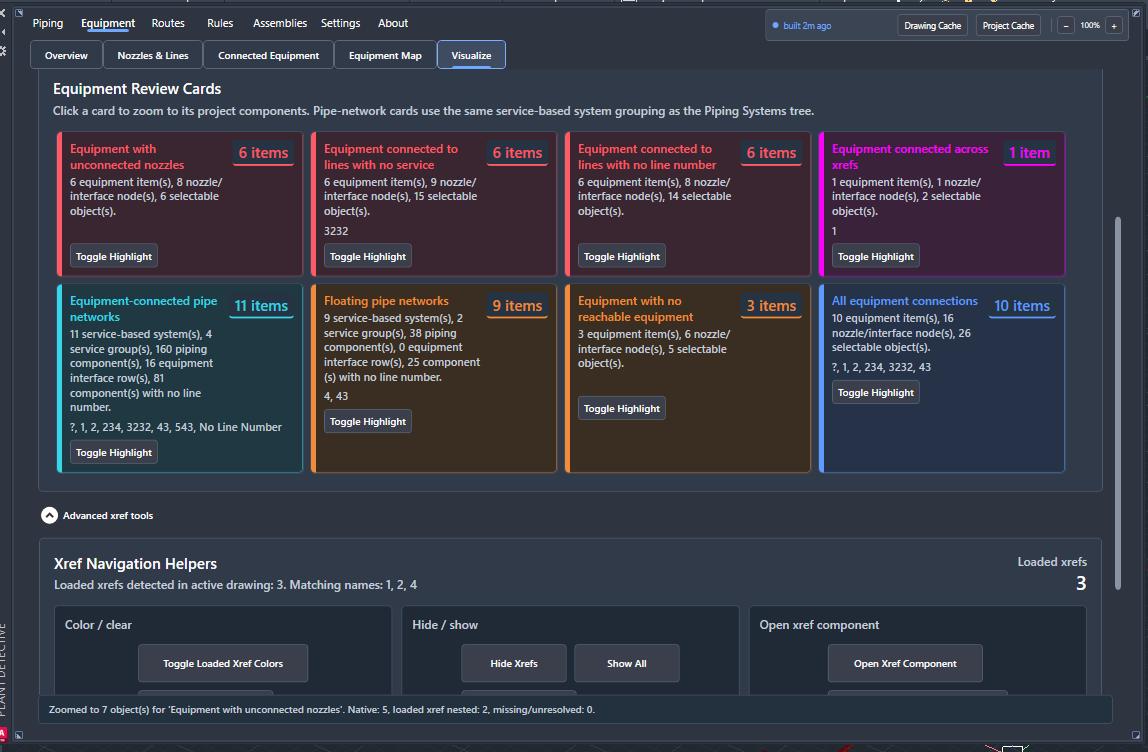
- Open Visualize and choose Current Drawing.
- Read Equipment Review Cards.
- Click a review card to select its objects.
- Use Highlight for a visual review.
- Use Isolate Selected to reduce clutter and End Isolation to restore visibility.
- Use Clear Highlights to finish.
In Project, use review cards, legend Toggle Highlight and Zoom, and the provided loaded-Xref color/visibility/opening actions. Read status messages when components cannot be resolved in the current model context.
Interpret equipment review categories
| Category | Meaning in cached topology |
|---|---|
| Equipment with unconnected nozzles | Nozzle/interface nodes have no connected topology edge. |
| Equipment connected to lines with no service | Connection exists but connected service is blank, unknown or missing. |
| Equipment connected to lines with no line number | Connection exists but connected line number cannot be resolved. |
| Equipment connected across xrefs | Interfaces connect through an Xref/project boundary; current project topology is needed to detect these. |
| Equipment-connected pipe networks | Service-based systems reach at least one equipment interface; service changes split systems, line-number changes do not. |
| Floating pipe networks | Service-based piping systems have no equipment interface; review possible orphaned/incomplete fragments. |
| Equipment with no reachable equipment | Equipment reaches piping but no other tagged equipment through topology; differs from an unconnected nozzle or floating network. |
| All equipment connections | Connected interfaces, including direct and Xref connections. |
In Current Drawing, clicking a card selects available objects. In Project, clicking a card zooms to available targets. Zoom changes framing, Select selects objects, and Highlight/Toggle Highlight adds or toggles overlays. These actions do not repair connections or fill metadata. Unavailable drawing/Xref targets can limit visual results; read status messages.
What to expect
The overview summarizes cached equipment information and links it to component review.
Important notes
- Equipment identification depends on readable Plant 3D objects and metadata.
- Different drawings with the same filename can create ambiguous project results in the available release. Check each source drawing when counts appear merged.
- An equipment item with no displayed connection does not by itself prove that all its nozzles are physically disconnected.
Screenshots